A car with a large screen and a dramatic bird's-eye view may look easier to park in a showroom. On a tight driveway, however, a clear audible warning may be more useful than a picture you cannot glance at continuously. Parking sensors, a rear camera and a surround-view system answer different questions. Their best combination depends on the space, the driver and the actual execution in the variant you buy.
What each system shows
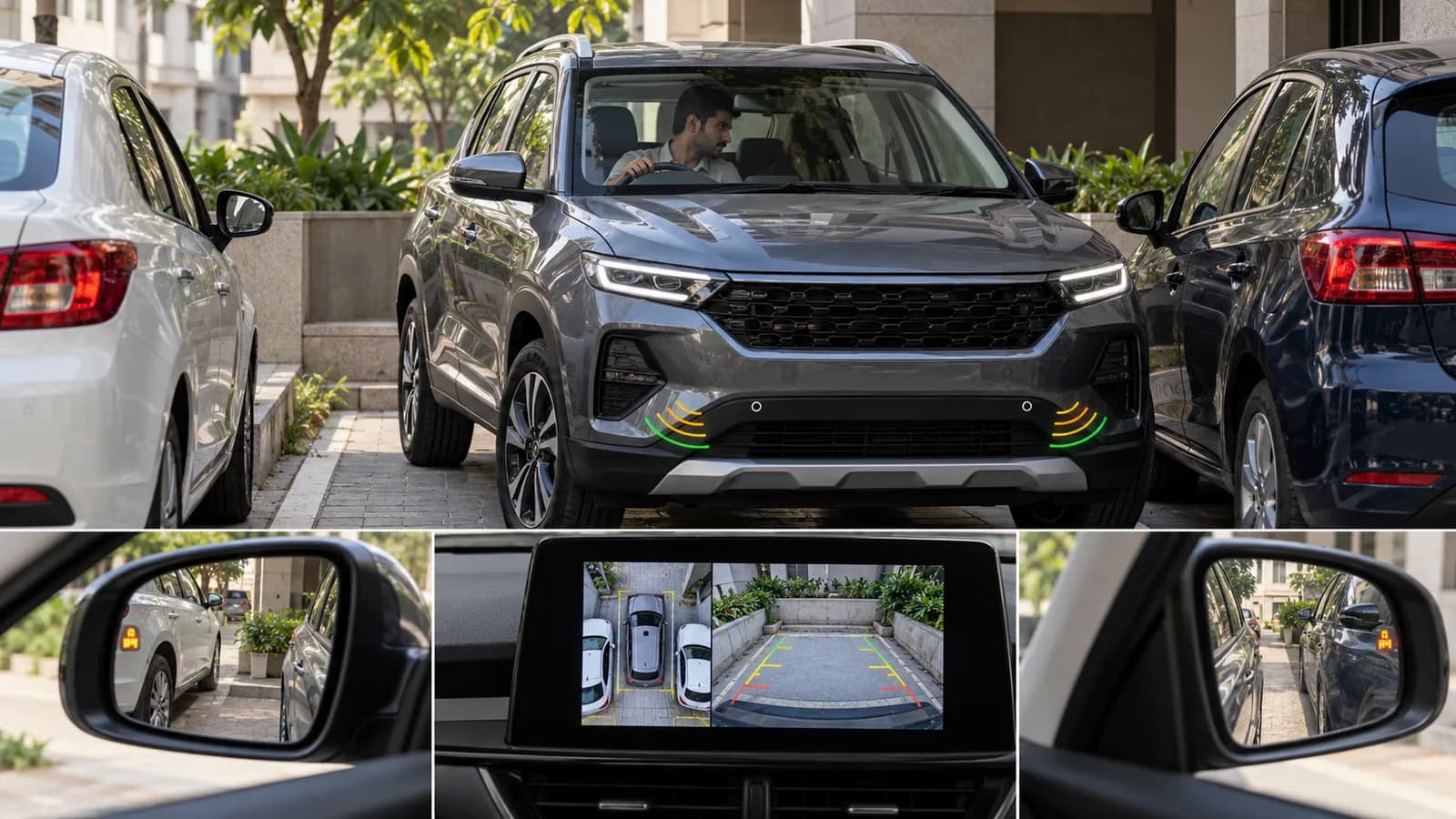
Ultrasonic parking sensors estimate the distance to nearby obstacles and warn through beeps, a graphic or both. Bosch describes how such systems use reflected ultrasound and how their warning range and display depend on the vehicle. Sensors are particularly useful when you need an audible cue while your eyes are looking outside the car. They do not create an all-seeing protective zone.
A rear camera shows the scene behind the vehicle when reverse is selected. It can help reveal a low object or painted line that is hard to see through the rear window, but perspective, lens distortion, rain and dirty glass can mislead. A 360-degree or surround-view system stitches images from several cameras into a simulated overhead perspective. This is useful for kerbs and side clearance, but the composite is a processed view rather than a literal camera hanging above the car.
What can still be missed
Thin posts, a low object, a moving child or an obstacle close to a bumper corner may not appear where you expect. Sensor coverage depends on number and position of sensors; cameras have fields of view and blind spots. A warning tone can also be distracted by traffic noise or ignored through over-familiarity. Hyundai's owner-manual explanation of surround-view limits warns that displayed distance may differ from reality, uneven ground can distort the interpretation and the driver must still check surroundings directly. That manual describes a particular vehicle's system, not every Hyundai sold in India.
Camera guidelines are assistance, not a measurement instrument. They may move with steering or remain fixed depending on the car. Cargo load can change the car's attitude and the relationship between a line on the screen and the ground. An aftermarket camera installed at a different height may behave differently from a factory-fitted one. Verify the exact implementation rather than relying on the label.
The practical showroom test
- Identify the exact variant and confirm whether it has rear-only or front-and-rear sensors, a rear camera, or a full surround view.
- With a dealer present and clear space around the car, assess the warning at a slow approach to a visible wall or bollard. Never test by driving towards a person.
- Reverse into a typical marked bay and note whether the image is bright enough and whether the guidelines are easy to interpret.
- Check a front corner and a kerb visually from outside before comparing with the screen. This reveals what the system does not show.
- Test in daylight and, if possible, a dim car park. Screen glare or poor camera exposure can be more important than resolution claims.
If your home parking space has a sharp turn, ask whether the camera view appears quickly after a gear change and whether you can select a front or side view when moving forward. Delay and menu friction matter in daily use.
Choosing for different drivers
A short hatchback with good outward visibility may need only clear rear sensors and a usable camera. A wider car in a narrow basement may benefit from front sensors and a reliable side view. For a tall SUV, checking the front corners and low kerbs can be especially valuable. A surround-view feature is worth paying for only when it actually reduces uncertainty on the obstacles you face, not because it makes the feature list longer.
People who share a car should try the system themselves. Camera interpretation, screen placement and audible warnings feel different to different drivers. Check whether volume can be adjusted without silencing a safety warning altogether, and whether the view can be summoned while inching forward at parking speeds.
Rain, dirt and repairs
Monsoon spray or mud can obscure a camera lens. Clean it gently according to the owner's manual. A bumper impact or repaint may disturb sensor position, and a replaced mirror or tailgate may affect camera alignment. After such repairs, verify that warnings and on-screen views still behave normally. Do not assume the system is fine just because the image turns on.
Parking aids are best treated as extra information. Look around the car before moving, use mirrors and direct observation, and stop when the scene is uncertain. The most useful setup is one that gives the driver a clear cue without encouraging them to delegate judgement to a beeping bumper or a stitched image.
A tight-garage example
Imagine a driver entering a basement bay with a wall at the back, a column on the front-left corner and a raised kerb on the right. Rear sensors are helpful when reversing towards the wall, but they may not answer whether the front bumper will swing into the column. A rear camera shows the bay line and any low object behind, yet it does not show the kerb beside the front wheel. A surround-view image may add useful side context, provided its stitched picture is clear and timely. In this scenario no single feature removes the need for a spotter or a direct check if space is very tight.
Now consider a parallel space on a busy street. Listening for progressive sensor warnings while watching traffic may be easier than staring at a large screen. Which aid is “best” changes with the task. That is why the dealer demonstration should recreate your most awkward parking situation, not just a straight reverse into an empty showroom bay.
Features that sound similar but differ
“Rear parking assist” might mean a beeper without a camera. “Reverse camera” may include only a static image, while another variant overlays predicted path lines. “360 camera” may be available only at low speed, or only when reverse is engaged. Some cars add automatic emergency braking during low-speed manoeuvres, but do not infer that capability from sensors alone. Read the exact variant sheet and the manual, then test the system as fitted.
Check whether warnings can be silenced temporarily and whether a trailer hitch or external carrier interferes. If you regularly park near a gate with protruding metalwork, ask a knowledgeable person to observe the manoeuvre from outside during an initial supervised test. Do not assume a warning will trigger for every narrow or oddly shaped object.
Ownership after a minor bump
A scratched bumper can still hide a shifted ultrasonic sensor bracket. A camera lens can show an image while its alignment is off, changing the apparent relation of guidelines to the ground. After body repair or repainting, verify the system in a safe familiar space and ask the repairer whether calibration or a check is prescribed. If one sensor persistently reports an obstacle where none exists, get it diagnosed rather than training yourself to ignore all warnings.
Before accepting delivery of a new car, inspect camera cleanliness and lens position. Test the view in the exact vehicle being handed over. A feature you paid for should work without forcing a driver to guess what the screen or tone means.